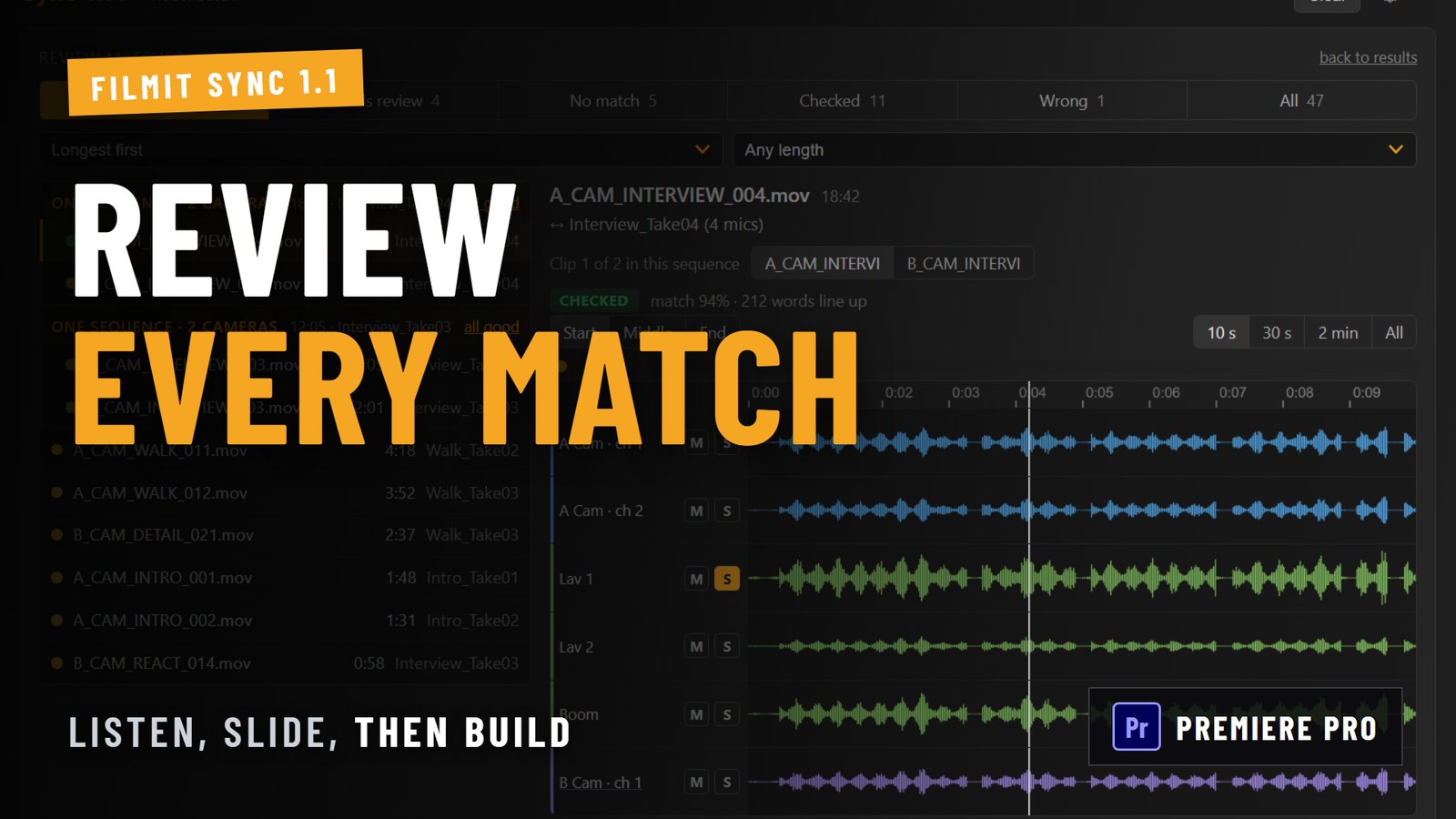
Sync 1.1 for Premiere Pro adds Review, a screen where you check every audio match before anything is built. Pick a clip, see the camera audio and the recorder audio as waveform lanes, press play to hear them together, and slide the recording a frame at a time if it is slightly off. Then create one sequence, or all of them, straight from Review.
The update also changes how Sync decides what counts as a match, so big shoots with many takes of the same script assemble the way you would expect. Here is what is new and how to use it.
What is new in Sync 1.1?
The short list, all in the Premiere Pro version of Sync:
- Review: check any match by eye and by ear, fix it, and mark it Good or Wrong before building.
- Recorder folders: a folder holding one file per mic is treated as one recording.
- Auto confidence: a new setting that places strong matches plus each clip's best remaining match.
- Smarter matching: long interviews score properly, two clips from the same camera can no longer be stacked as a fake multicam, and oversized scenes are held back instead of built.
- Exact placement: clips with a built-in head offset, such as RED footage, now land exactly in place, and camera audio stays linked to its picture.
- Faster re-runs: running the same footage again reuses the earlier analysis.
- Bug reports: Settings, Log can now save a report you can send to us.
How does the Review screen work?
After Analyze finishes, open Review. On the left is your list of clips. Pick one and the right side shows its audio as lanes: the camera audio and the recorder audio, one lane per channel, with mute and solo on each.
Press play to hear camera and recorder together. If the two line up, the words land at the same moment and you hear one voice, not an echo. Grab the playhead to scrub to any part of the clip, so you can check the start of a take and the end of it, not just one spot.
Multi-camera takes show every camera and every recording in that sequence together, so you can see all the angles of a scene against the clean audio in one view.
Pro Tip: Solo the recorder lane and the camera lane one at a time before you judge a match. A quiet camera scratch track is easy to miss under a loud lav, and the solo buttons make the comparison honest.
How do you fix a match that is slightly off?
Select the recording in Review and slide it frame by frame against the camera audio until the waveforms and the sound line up. If you go too far, Reset puts it back where Sync placed it. Nothing on your timeline changes while you do this, because nothing has been built yet.
When a match is right, mark it Good. If Sync paired a clip with the wrong recording, mark it Wrong so it stays out of the build.
Can you build straight from Review?
Yes. Once you are happy with a sequence, create it from Review. You can build one sequence at a time while you work through a shoot, or create all of them in one go when you are done. Strong matches you never opened still build as before, so Review adds a checkpoint without adding a chore.
What changed for multitrack recorders?
Many field recorders write a folder per take, with one file for each microphone. Earlier versions treated every one of those files as its own recording, which meant a lot of extra comparisons and mic files competing with each other for the same clip.
Sync 1.1 treats a recorder folder with one file per mic as a single recording. The result is fewer comparisons, faster analysis, and no more one microphone arguing with another about which take a clip belongs to.
What is the new Auto setting?
Some shoots are hard on any matching tool: an anchor reading the same script many times, or a series of interviews that all open with the same question. Every take sounds a lot like the others, so no single match looks certain.
The new Auto setting handles that by placing strong matches plus each clip's best remaining match, and holding the rest for you to look at in Review. The stricter and looser settings are still there if you want to choose for yourself.
Pro Tip: On a shoot like that, sort your clips longest first in Review. The long interview takes are the ones that carry your edit, so check those before the short cutaways.
What placement problems does 1.1 fix?
Some camera files, RED footage among them, carry a short head of media before the first frame Premiere Pro plays. Sync now measures that offset and places those clips exactly, instead of a few frames early. Camera audio also stays linked to its picture in the sequences Sync builds, and scenes that would stack too many angles are held back instead of built as one oversized sequence.
What are the honest limits?
- Premiere Pro only, for now. Review and the rest of 1.1 are in the Premiere Pro version. The DaVinci Resolve version is a separate release.
- Review is a checkpoint, not magic. If a clip has no usable sound at all, Review will show you that, but it cannot invent a match.
- It still needs audio in common. Sync matches by comparing sound. Silent B-roll with no scratch audio has nothing to match against.
Why we built Review
A batch sync tool lives or dies on trust. When it places a hundred clips and three of them are wrong, you end up checking all hundred. We wanted the opposite: let the strong matches build themselves, and give you a fast, honest way to look at the handful that deserve a second look, with your ears and not just a confidence score.
If you are new to syncing in Premiere Pro, our guide to syncing audio and video in Premiere Pro covers the native methods first, and it is a good companion to this one.
How do you get Sync 1.1?
Sync is included with a Filmit Studio subscription, along with every other Filmit tool, and there is a 7-day free trial. If you already have Sync installed through Filmit Studio, update it from the Studio app to get 1.1. Questions or feedback are welcome in our Discord.