Let me start with the money math, because it is the whole reason I made this video. There is exactly one step in RoughCut that can cost money, and it is the AI analysis: the moment ChatGPT or Claude reads your transcript and designs your story. If you point that step at your own API key, each analysis runs about $0.20 with a model like GPT-4.1. That sounds like nothing, and for one analysis it is. The problem is that editing is never one pass. You tweak the story and re-run, you add a deliverable and re-run, you try a different model and re-run. Run that analysis enough times across a real project and the pennies quietly become actual money.
And to be clear about what is not on the meter: building the cut onto your timeline never costs a thing. When you click Build in Premiere or Build in DaVinci, RoughCut is just assembling sequences on your own computer, so that is free and always will be. The only per-use cost is that one AI analysis step, and this article is about skipping even that.
So when the team built RoughCut, our AI assistant editor for Premiere Pro and DaVinci Resolve, we built in a free path from day one. You never have to pay for a single analysis just to try ideas. In this article I walk through the cheaper way, the free way, so you can run the entire analysis with no API key at all.
This video may reference an older version of RoughCut. Features and UI may have changed since recording.
Why the pennies add up
Here is the honest version of the cost story. An API call is cheap in isolation. But a rough cut is a living thing. You watch the first pass and realize the opener is weak, so you re-run. You decide you also want six shorts for social, so you re-run. You wonder whether a different model tells the story better, so you re-run again. Each of those analyses is another $0.20, and none of them feels expensive in the moment. Stack a project's worth of iterations on top of each other and it stops being free-feeling.
That iterative loop is exactly what makes RoughCut useful, so we did not want to tax it. The free path exists so you can experiment as much as you like without watching a meter. It is not a stripped-down teaser either. It is a genuine, first-class way to run the tool.
Set up your project (and keep the batch small)
The setup for the free route is the same as any other, with one small discipline: keep the batch modest so a free chat account can handle it in one pass. Open RoughCut in Premiere via Window, then Extensions, then RoughCut. In DaVinci Resolve you open it from Workspace, then Workspace Integrations. If it does not appear right away, close and reopen the host and it will be there.
Add your sequences as sources. For the demo I had four synced sequences from a distillery mini-documentary, an owner interview, a distiller interview, and two facility tours, already organized and aligned. Click to add each one, then click Transcribe all. RoughCut may first show an Install Whisper button; Whisper is a local transcription engine that runs on your own computer, so it is free, private (nothing goes to the cloud), and noticeably better than the native transcription in the host. Let it work through every source and turn your footage into text.
Now tell it the story. Type what the piece is about in plain language, then add your deliverables. In the demo I set a short brand film and a small batch of shorts (six shorts, under 30 seconds, 9:16), which is a sensible size for the free path. You can change each preset one by one, 1:1, 16:9, 9:16, whatever the deliverable needs.
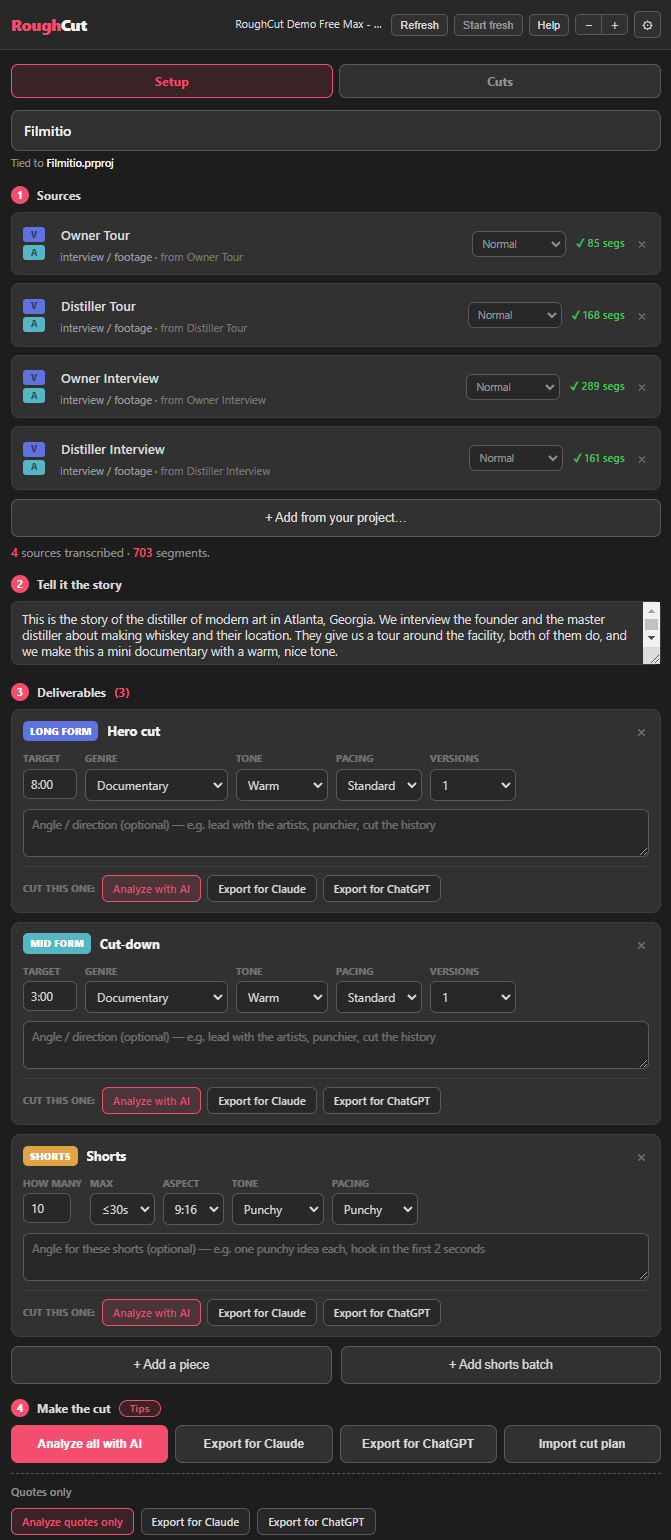
Pro Tip: For the free route, keep the deliverable list small, for example a short brand film plus a few shorts rather than a long documentary plus fifty shorts. A leaner job fits comfortably inside a free chat account's smaller context window, so the analysis comes back clean. You can always import more cut plans afterward.
The free workflow, step by step
This is the core of the article. Once your project is set up, here is the exact free path, straight from the video.
1. Export instead of analyze. If you do not mind paying, you would click Analyze with AI here and spend about $0.20 for a one-click analysis. We are going the free way instead, so click Export for Claude (or Export for ChatGPT). RoughCut saves a text file to your machine.
2. Open a free chat account. Open a free Claude or ChatGPT account. No paid plan required. In the demo I stayed on the free plan and did not upgrade.
3. Drag the file in and send. Drag the text file you just exported straight into the chat, and simply click send. You do not need to write a prompt or do anything else. The file already tells the model everything it needs.
4. Let it write the cut plan. The model thinks for a bit and then writes a JSON cut plan (the hero or brand cut plus your shorts batch). When it finishes, download the JSON file.
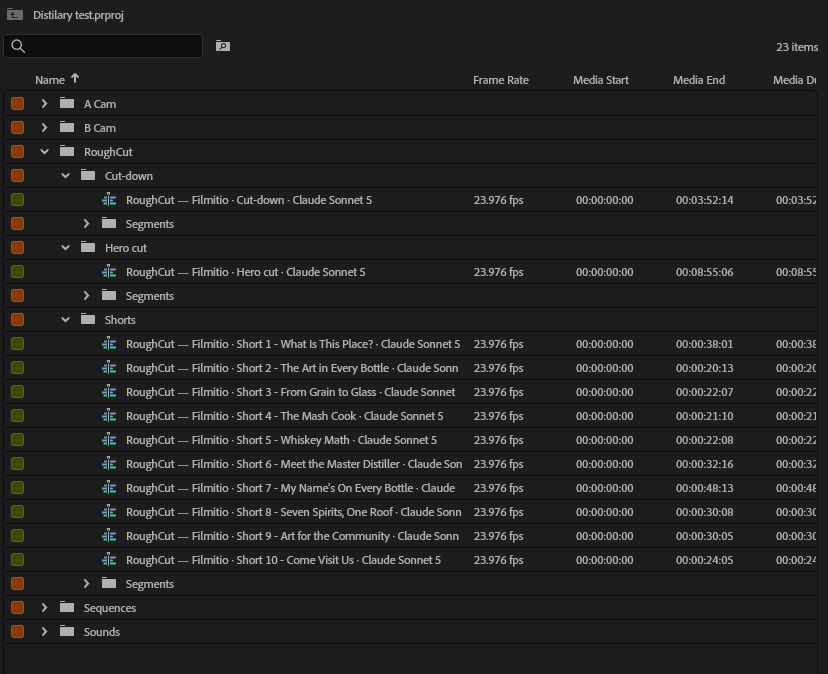
5. Import the cut plan. Back in RoughCut, click Import cut plan and choose the JSON you just downloaded. Your cut appears, fully built and organized, named after the file you imported so everything stays tidy. RoughCut hits your target too; a three-minute goal came back at about 3:21 in the demo.
6. Build it. Scroll to the bottom and click Build in Premiere, or Build all in Premiere to assemble every sequence at once. RoughCut makes a folder and builds the sequences live onto your timeline, the hero cut and all the shorts. Building is always free, however many times you do it. Done: no API key, and nothing spent on analysis.
The honest caveats
I want to be straight about the tradeoffs, because they are the reason the free path works when you respect them. Free chat accounts have a smaller context window than paid ones. If you try to queue up a fifteen-minute documentary plus fifty different shorts in a single pass, that is where free accounts start to break down. It will not politely warn you; it will just get worse.
The fix is simple: take your time, be meticulous, and work in small batches. That is precisely why RoughCut has per-deliverable export buttons. You can feed the free chat one manageable piece at a time, import that cut plan, then export and import the next one. Multiple imports stack up into the same project, so you get the full result without ever overloading a single free chat.
And to be clear, the paid path still exists and it is perfectly fine. Add an OpenAI or Anthropic API key in settings (or in your Filmit Studio dashboard, where saved keys carry over) and click Analyze with AI for a faster one-click run. A paid ChatGPT or Claude account also handles bigger jobs in one go. But the free path is a first-class citizen here, not a crippled demo, and for most iterating it is all you need.
Pro Tip: Different models write different stories, because that is just the nature of it. Since the free path costs nothing, feel free to run the same export through both Claude and ChatGPT and import both cut plans, then build whichever tells the story better. Experimenting is free, so use that.
You are still the editor
One thing the free workflow does not change: RoughCut is your assistant editor, not a replacement for you. It handles the tedious part, scrubbing your transcripts for the good quotes and assembling a first pass, and then it hands the timeline back to you. You still reorder lines, add or remove quotes, extend clips, and shape the pacing. The point is to speed up your workflow, not to take it over. And all of this is identical in DaVinci Resolve, so whichever host you cut in, the free path is the same.
Key takeaways
You can run the entire RoughCut analysis for free, with no API key, as long as you keep your batches small and let a free Claude or ChatGPT account do the thinking.
Each AI analysis costs about $0.20 with a model like GPT-4.1, and editing means running it again and again, so the pennies add up. Building onto your timeline is always free.
Click Export for Claude or ChatGPT, drag the file into a free chat, click send, download the JSON, and Import cut plan.
Free chats have a smaller context window, so use the per-deliverable exports and import multiple cut plans instead of one giant job.
An OpenAI or Anthropic key gives you a faster one-click run, and a paid chat account handles bigger jobs, but the free path stands on its own.
The identical export-and-import flow runs in DaVinci Resolve, and RoughCut assembles the rough cut while you keep the craft.
Get started with Filmit
RoughCut installs through Filmit Studio, the desktop app you download from your dashboard to manage every Filmit plugin for Premiere Pro, DaVinci Resolve, and After Effects. It comes with a 7-day free trial that unlocks the whole bundle, so you can try the free workflow above without spending a cent on API calls. RoughCut is included in the Filmit Studio subscription, one price for the whole growing suite rather than a steep fee per plugin, and that subscription is what funds the continuous updates and the new tools we keep shipping. One install puts RoughCut in your editor and keeps it current.
Pair it with JumpCut, our auto silencer and camera switcher for Premiere Pro, included in the same bundle. RoughCut is community-driven: people request a tool or a feature and the team builds it, often within days, so come tell us what you need on Discord. Start a free trial, install any of the tools, and we are there for questions and feedback.