I have edited for years, and the same truth holds every time: building the rough cut is the most arduous part of the whole job. You shoot an interview, or four, and then you sit down to scrub hours of footage looking for the handful of lines that actually carry the story. That is assistant-editor work, slow and boring, and it stands between you and the parts of editing that are actually fun: shaping the story, dialing the pacing, grading the color.
So the team built RoughCut, a new plugin for Premiere Pro and DaVinci Resolve that does that grind for you. It does not finish your edit. It builds the rough cut, drops it onto your timeline, and gets you straight to the craft. Here is how it works.
This video may reference an older version of RoughCut. Features and UI may have changed since recording.
What RoughCut is: your assistant editor
The mental model matters, so lead with it. RoughCut is your assistant editor. It is not going to fully edit your video for you, and it is not trying to. Its whole job is to get past the tedious part, pulling the good quotes out of your transcripts and assembling them into a first pass, so you can get to work fast on the fine tuning instead of starting from a blank timeline.
It works the same in Premiere Pro and DaVinci Resolve, so you can follow either one. RoughCut is a paid plugin, but it comes with a 7-day free trial through Filmit Studio, and the trial unlocks the whole Filmit bundle. You install it from Filmit Studio, then open it in Premiere via Window, then Extensions, then RoughCut. If it does not show up right away, restart the host and it will appear.
The panel has two tabs, Setup and Cuts. You spend the first few minutes in Setup telling RoughCut what you have and what you want, then it moves you to Cuts.
Setup: sources, transcription, and deliverables
Start by clicking Add from your project. RoughCut pulls up the sequences already in your project and lets you bring them in as sources. For the demo I used four sequences from a distillery mini-documentary: an owner interview, a distiller interview, and two facility tours, all synced and prepped. Add them and they become the raw material RoughCut cuts from.
Next, transcribe them. RoughCut may show a small install box for transcription the first time, which sets up Whisper, an open-source transcription engine that runs locally on your own machine. It is free, it is private (nothing goes to the cloud), and it is remarkably accurate. Install it once, click Transcribe all, and it works through every source and turns your footage into text. That text is the thing RoughCut analyzes, so this step is the foundation for everything after it.
Each source gets a priority setting. Mark footage as prioritize and it gets used more; mark it must-include and it never gets skipped. Then you type the story in plain language, for example: "This is about the Distillery of Modern Art, we interview the owner and master distiller and tour the facility, a mini documentary." That one sentence gives the analysis its direction.
Finally, choose your deliverables. You can add as many as you want. In the demo I set a hero cut (an 8-minute documentary, standard pacing, warm tone), a cut-down (a 3-minute brand film, punchy), and a shorts batch (10 shorts under 30 seconds, 9:16). More options keep appearing as we update the tool based on how people use it.
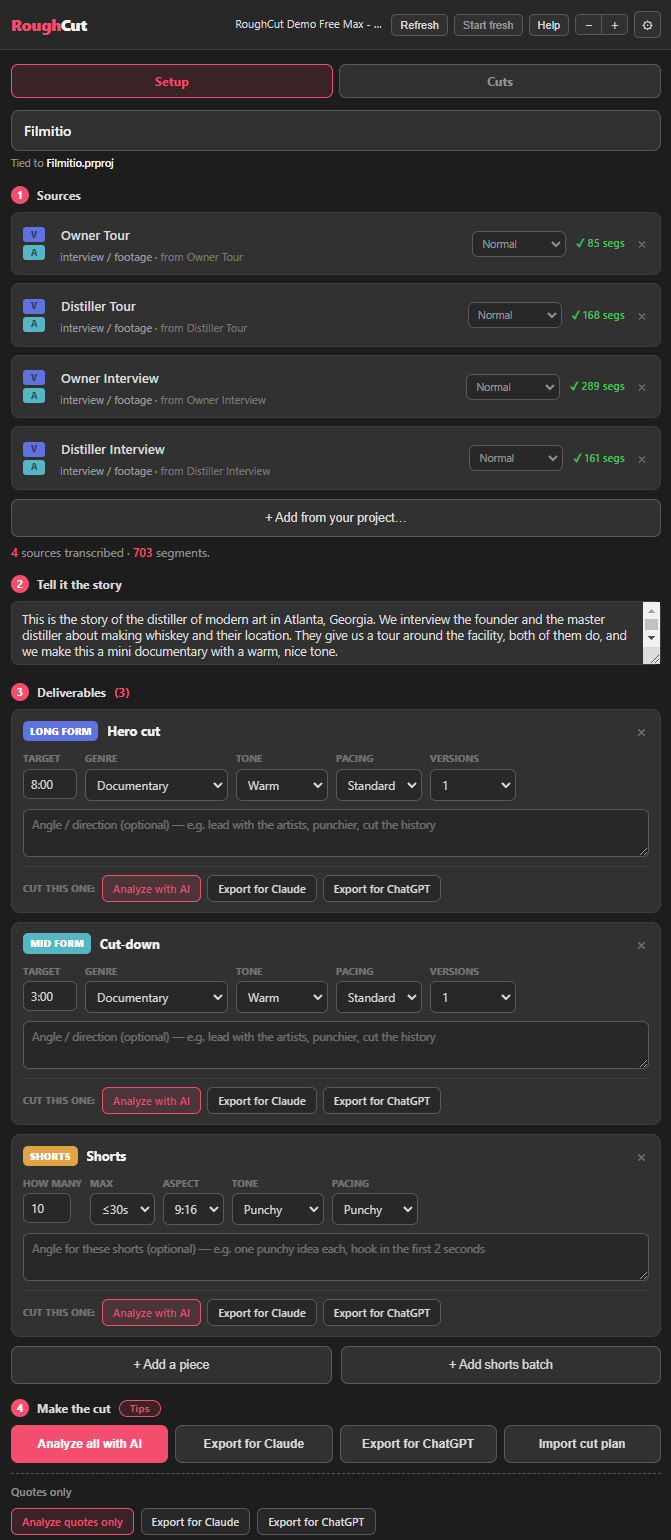
Pro Tip: Type the real deliverable length you need. If you enter 15 minutes, RoughCut knows it is a long-form piece; if you enter 30 seconds, it treats it as a short. The numbers you give it shape the whole cut.
No API required: run it free with ChatGPT or Claude
This is the headline, and it is the question everyone asks first. RoughCut does not require an API. You can run the entire analysis for free using the free version of ChatGPT or Claude, because odds are you already have one of those accounts.
Here is the free path. Click Export for ChatGPT or Export for Claude, and RoughCut hands you a text file. Drop that file into a chat, and the model reads it and returns a JSON file. Download the JSON, click Import cut plan, and RoughCut brings the whole cut in. Every JSON you import lands as a new cut or short, kept organized for you. It takes a couple of extra steps, that is the honest tradeoff, and it works best when you keep the deliverable list small, since more deliverables take more processing. But it costs nothing.
The other path is an API key. In settings you add an OpenAI or Anthropic key, choose your model, and click Analyze with AI for a faster one-click run. The demo used GPT-4.1, a very affordable model at about $0.20 per analysis, and later Claude Sonnet 5. If you already saved your keys in your Filmit Studio dashboard, they carry over and you just pick the model. We built both paths in on purpose so the choice is yours, not forced. Either way, that cost is only ever the analysis step: building your cut onto the timeline in Premiere or DaVinci is always free.
Pro Tip: Going the free route? Start with one deliverable rather than three. The bigger the deliverable list, the more work you ask the free chat to do in a single pass, so a lean list runs cleaner. You can always import more cut plans afterward.
The Cuts panel: editable cuts, all quotes, and Excel
When the analysis finishes, RoughCut drops you on the Cuts panel with every deliverable ready: the hero cut, the cut-down, and the shorts, each fully editable. This is where the assistant hands the wheel back to you. Reorder quotes by dragging them, move a quote to sit before another, or grab a whole section and slide it up or down. It is all designed to be reorganized before anything touches your timeline.
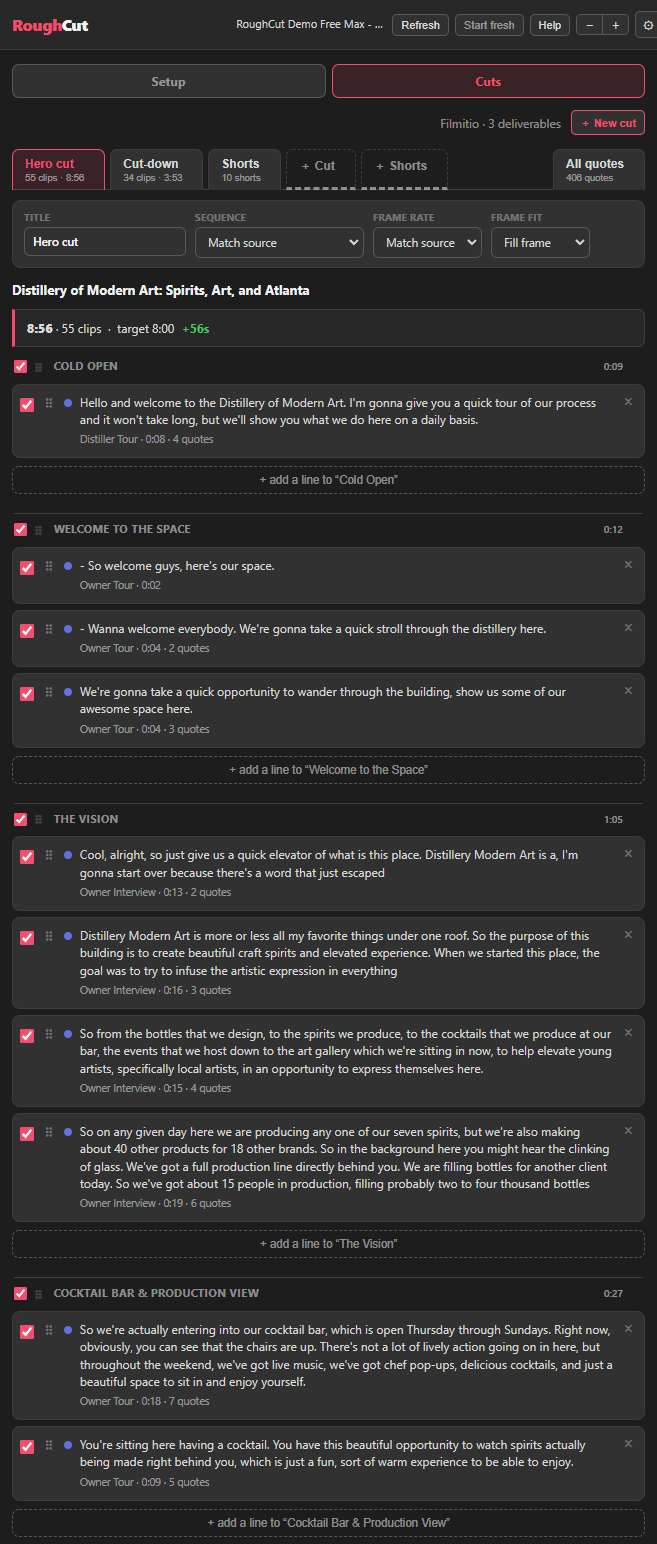
You are not stuck with what it chose, either. Add a new line and pick from tagged options, so you can drop in a fresh cold open or a call-to-action line pulled straight from the transcripts. RoughCut shows you each source's hooks and intros to choose from, and lines already used are flagged so you do not repeat them by accident. Do not like a line? Delete it.
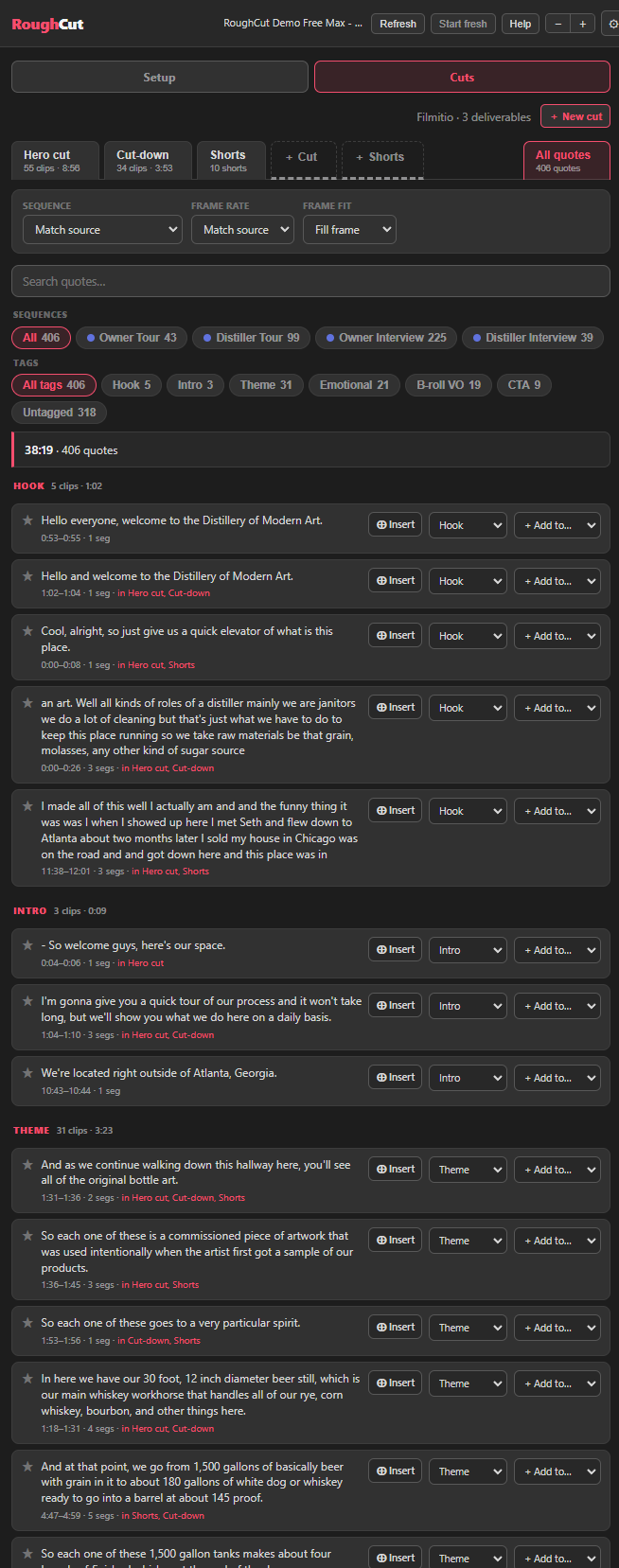
The All Quotes tab lists every single quote RoughCut pulled from the transcripts, auto-tagged for you (hooks, intros, and more) so you can scan them fast. And when you are working with a client, scroll to the bottom and Export to Excel. That gives you the full quote list and every cut plan laid out by section, so a client can read exactly what each piece says, pick what they like, and approve it. It ties directly back to your project, which is the part that makes it useful.
Build in Premiere Pro or DaVinci Resolve
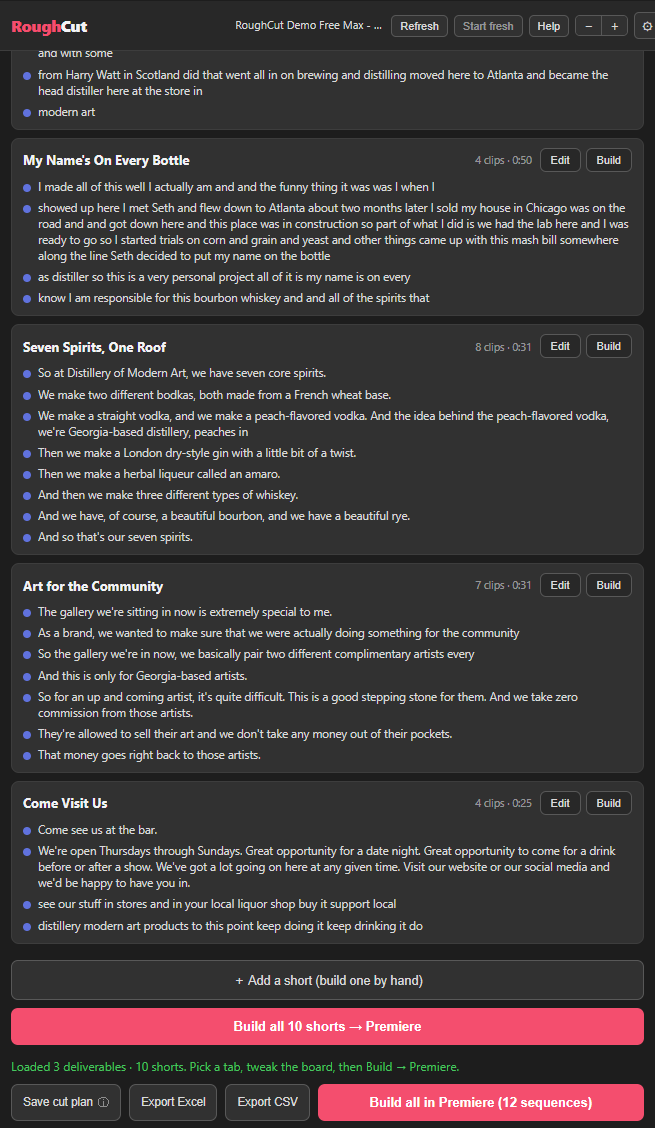
Once you are happy, building is one click. Grab a deliverable and click Build in Premiere, and RoughCut assembles it onto your timeline, organized automatically into a RoughCut folder with every segment it pulled. It is fully manageable and fully editable, exactly what you would expect: extend the timeline, trim, rearrange, and take the lead as the editor.
You can also browse your quotes and insert them straight into the timeline while you work. And if you want the whole thing at once, Build all in Premiere assembles every sequence, the hero cut, the cut-down, and all the shorts, in one pass. It all works the same way in DaVinci Resolve.
One nice quirk: different AI models build different stories, because that is just the nature of it. So you can run the analysis again with another model for a fresh take. In the demo, GPT-4.1 and Claude Sonnet 5 produced genuinely different hero cuts, and RoughCut keeps each run in its own labeled drop-down so you can compare and build whichever you prefer.
Pro Tip: RoughCut ties in with JumpCut, which is included in the same bundle. Let RoughCut assemble the story, then run JumpCut to strip silences and switch cameras automatically, and your rough cut is a long way toward a real edit before you have touched a keyframe.
Key takeaways
RoughCut turns hours of scrubbing transcripts into a first pass you can actually edit, in Premiere Pro or DaVinci Resolve.
RoughCut is your assistant editor. It handles the tedious quote-scrubbing and assembly so you focus on story, pacing, and color.
Run the whole analysis free with ChatGPT or Claude via export and Import cut plan, or add an OpenAI or Anthropic key for a one-click run.
Whisper runs on your own machine, so transcription is free, accurate, and never uploaded to the cloud.
Reorder quotes, move whole sections, add or delete lines, then build onto your timeline organized into a RoughCut folder.
Export the quote list and cut plans to Excel for approval, and get the same workflow in Premiere Pro and DaVinci Resolve.
Get started with Filmit
RoughCut installs through Filmit Studio, the desktop app you download from your dashboard to manage every Filmit plugin for Premiere Pro, DaVinci Resolve, and After Effects. It comes with a 7-day free trial that unlocks the whole bundle, and one install puts RoughCut in your editor and keeps it current.
Pair it with JumpCut, our auto silencer and camera switcher for Premiere Pro, which is included in the same bundle and ties in nicely once RoughCut has built your story. Start a free trial, install any of the tools, and the team is on Discord for questions and feedback.