What is up, this is Max, and I want to show you something that still feels like science fiction to me even after building it: you can point AI at a pile of interview footage inside Premiere Pro, click one button, and watch it assemble your entire rough cut live onto your timeline. A hero cut, a shorter cut-down, and a whole batch of vertical shorts, all built in front of you in one pass. And yes, this works exactly the same in DaVinci Resolve.
The tool is called RoughCut, and this is the full walkthrough, from installing it to watching it build a dozen sequences on my timeline. You can try the whole thing free (more on that below), but the star of the show here is the magic moment, so let me take you through it end to end.
This video may reference an older version of RoughCut. Features and UI may have changed since recording.
What "automatic editing" actually means here
Let me set expectations, because "AI edits your video" gets thrown around loosely. RoughCut is your assistant editor, not a replacement for you. I still sync the audio from the DJI mic on the guy giving the tour, I still align the boom on the interviews, and I still take the lead on story, pacing, and color at the end. What RoughCut automates is the single most tedious part of the whole job: scrubbing hours of interviews for the good lines and assembling them into a first cut.
That is the part that kills your afternoon, and it is the part RoughCut does for you in seconds. You stay the editor. It just hands you a rough cut instead of a blank timeline. Once you internalize that, the rest of the workflow makes sense.
Installing RoughCut and opening it up
RoughCut installs through Filmit Studio, the free desktop app. Start your free trial, create an account, and download Filmit Studio. Once it is installed, open My Tools, go to Premiere Pro, find RoughCut, and click install. That is it.
To open it in Premiere Pro, go to Window, then Extensions, then RoughCut, and the panel pops up. If it is not there yet, restart Premiere Pro and you are good to go. In DaVinci Resolve, you open it from Workspace, then Workspace Integrations. If you already know how to open plugins in Resolve, it is the same drill. From this point on, everything I show works identically in both hosts, so follow along in whichever one you edit in.
Add your sequences and transcribe them
For this project I had four sequences already sitting in Premiere Pro: an owner interview, a distiller interview, and two facility tours for a distillery mini-documentary. In RoughCut, click Add from your project, and it lists every sequence you have. Select the ones you want the AI to work from and add them as sources. Those become the raw material.
Next, click Transcribe all. The first time, you will see a small prompt at the top to install Whisper, the transcription engine. Install it once. It is completely free, it runs locally on your own machine, and nothing gets uploaded to the cloud, so your footage stays private. RoughCut then runs through every source and turns your interviews into text. Depending on the length of your footage this takes a little while, so let it run. That transcription is what the AI analyzes, so it is the foundation for everything after.
Pro Tip: Because Whisper runs on your machine and never touches the cloud, this workflow is safe for confidential client footage and NDA projects. Nothing leaves your computer during transcription.
Tell it the story and set your deliverables
Here is where you talk to it like a human. In the story box, describe your project in plain language, something like "this is about the Distillery of Modern Art, we interview the owner and the master distiller and tour the facility." One sentence gives the analysis its direction.
Then set your deliverables by clicking Add a piece. For this project I asked for an 8-minute documentary as the hero cut, a 3-minute documentary as the cut-down, and 10 shorts under 30 seconds at 9:16 for social. That single request covers your long-form film, your shorter brand piece, and your whole social batch in one go. You can add as many deliverables as you want and tune the length and format of each.
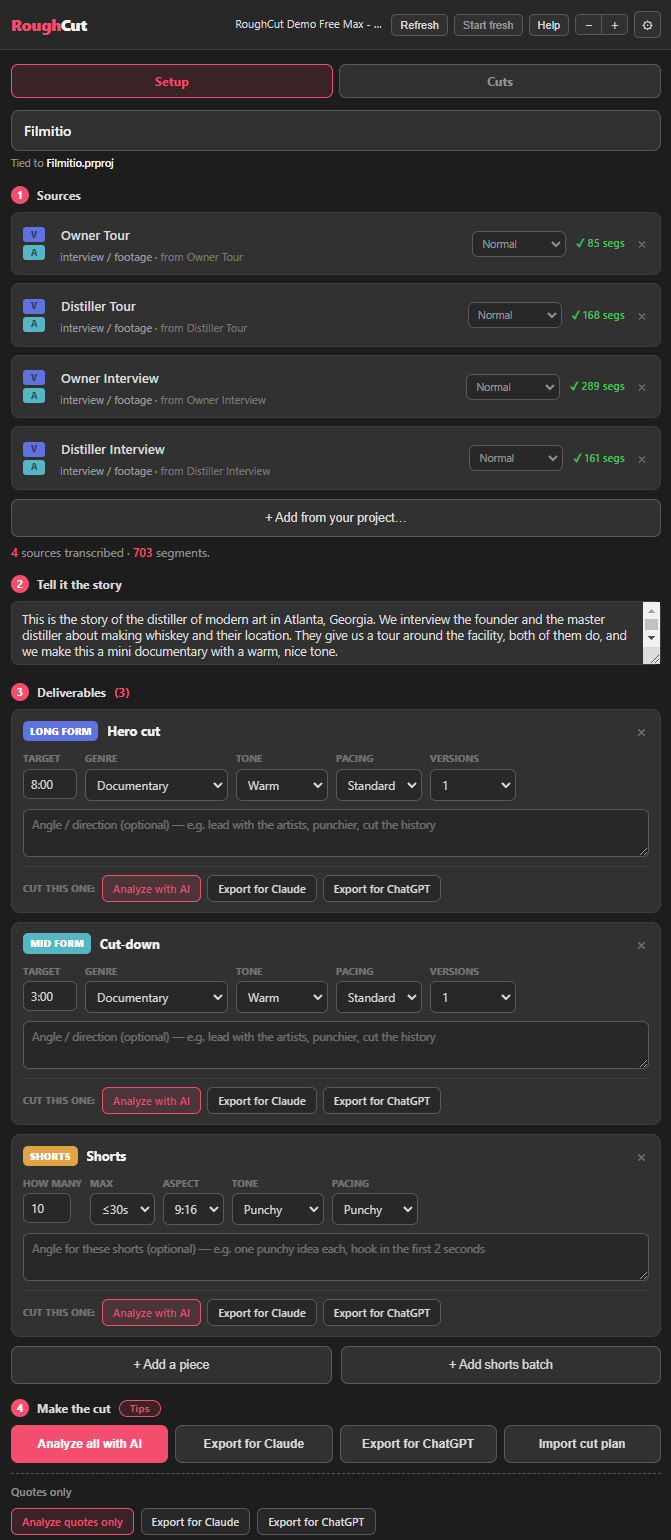
Pro Tip: Give it the real lengths you need. Ask for eight minutes and it treats the piece as long-form; ask for 30 seconds and it treats it as a short. The targets you set shape how it selects and paces the cut.
The magic moment: watch it build your cut
This is what you came for. With sources transcribed and deliverables set, click Analyze with AI. In the demo it churned through 703 quotes and designed three deliverables, then dropped me onto the results with a hero cut, a cut-down, and all my shorts, each built from the quotes it pulled and tagged.
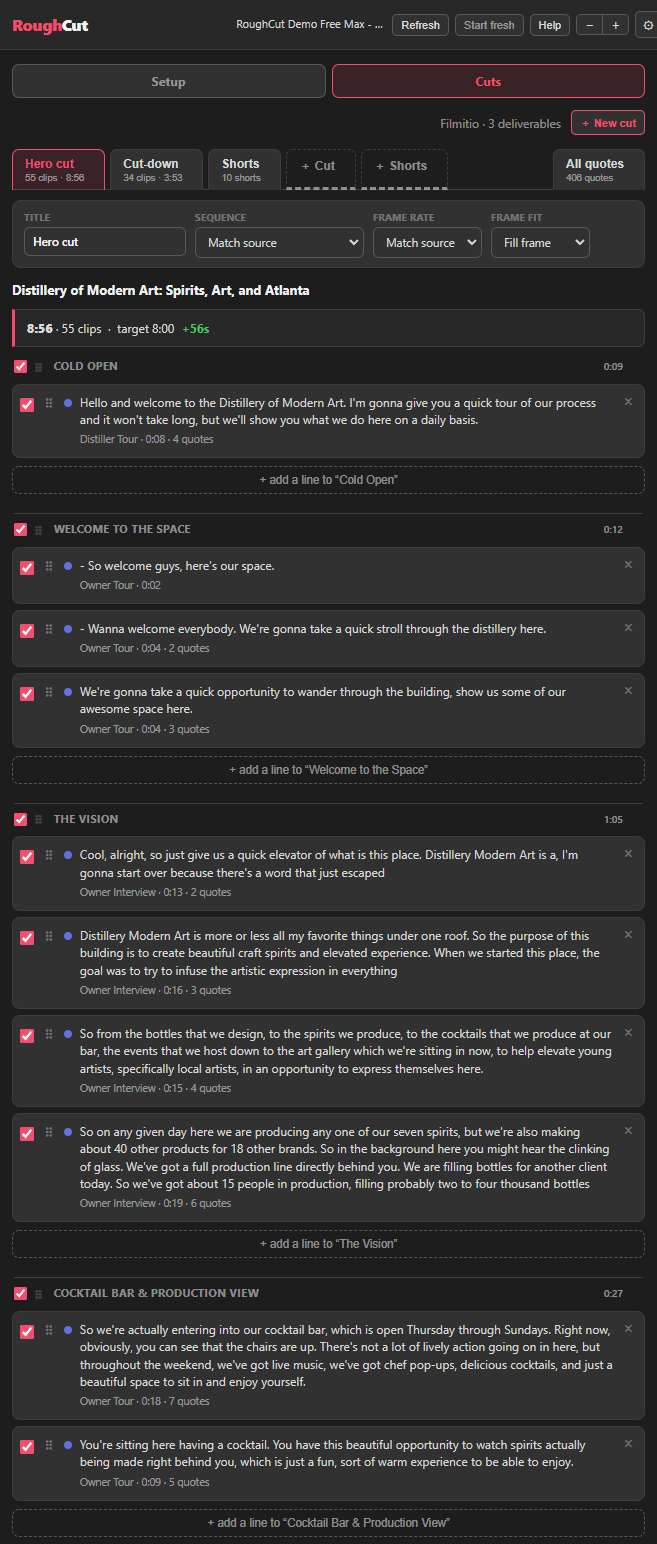
Now scroll to the bottom of RoughCut. You can build one deliverable at a time with Build in Premiere, or you can click Build all in Premiere and let it assemble every sequence at once. I clicked build all, twelve sequences, and just let it go. I did not lift a finger. It built the hero cut, then the cut-down, then every single short, live on my timeline while I sat there talking. It is genuinely fast, and watching your whole project materialize sequence by sequence is the part that makes people do a double take.
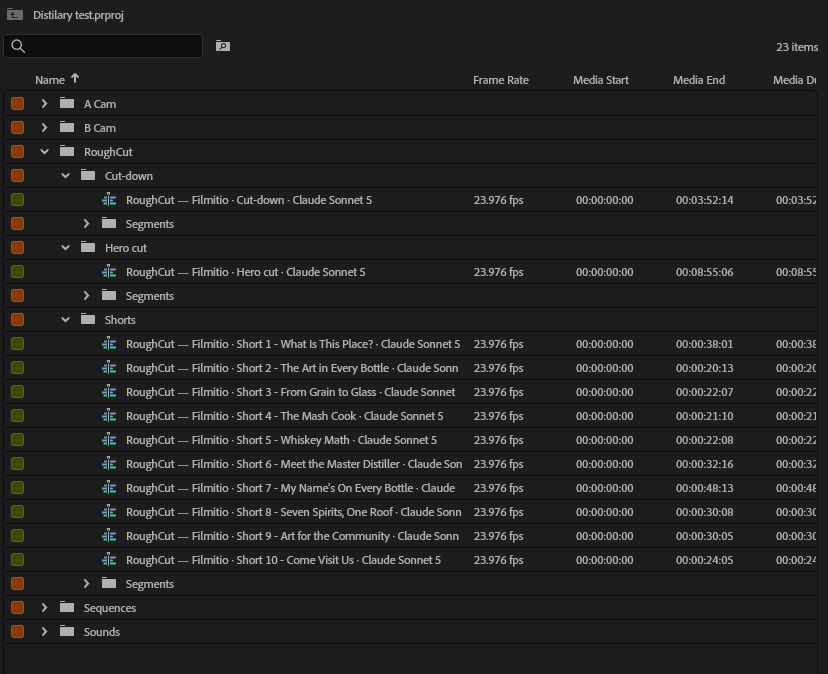
When it finishes, RoughCut drops everything into a tidy folder. It even names each file with the details of how it was made, the deliverable, the model used, the cut length, so you always know what produced what. You can rename them later. Open the hero cut, and there is your rough documentary, cold open and all, ready to refine. And every step of this is identical in DaVinci Resolve.
Refine it: search quotes, reorder, and build from scratch
The cut it hands you is fully editable, and this is where you take back the wheel. Every quote RoughCut pulled is auto-tagged, so you can search your quotes and filter by hooks, intros, and themes. Lines that have already been used show up greyed out so you do not repeat yourself. Want a different cold open? Add a line, pick a hook, and it drops in. Do not like a line? Delete it. Want to change the order? Drag a quote up or down and reorder the whole thing.
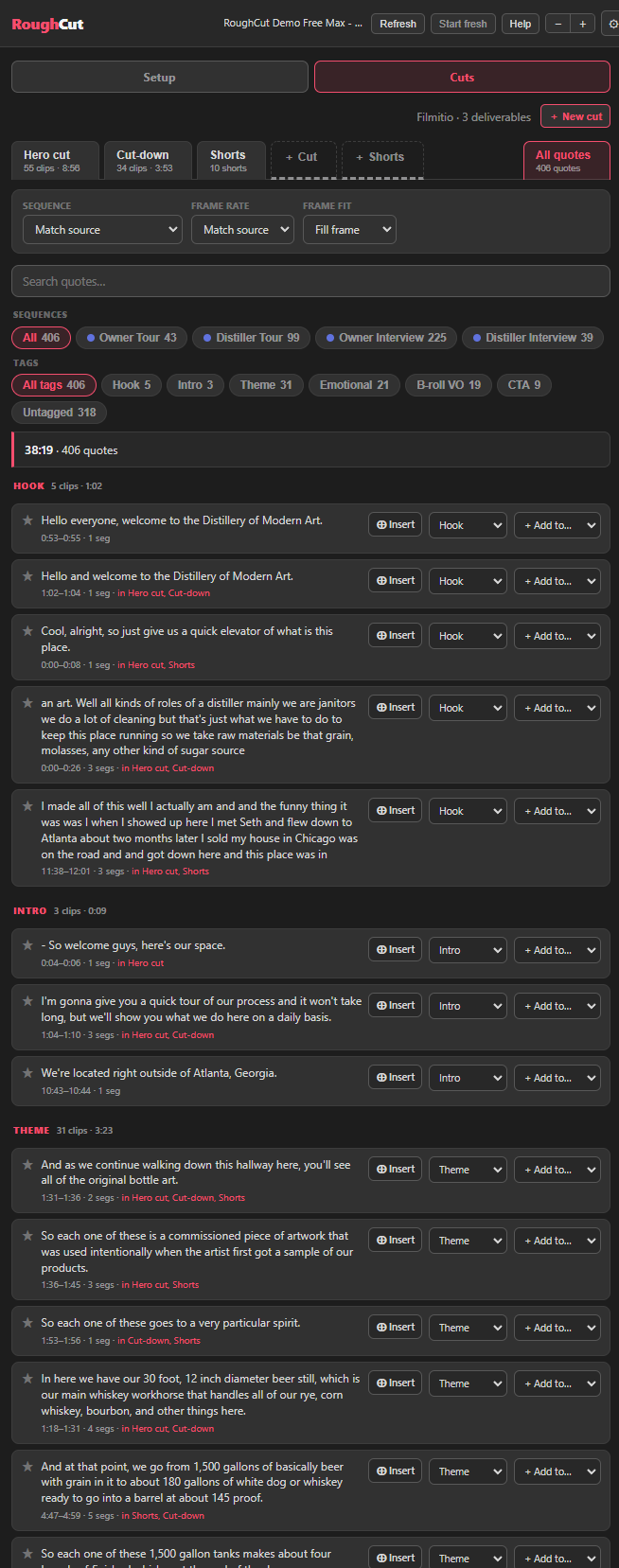
You can also insert a quote straight into your timeline while you work, which makes it a fast way to find and drop in exactly the line you want. And if you would rather not use an AI cut at all, you can build a new cut completely from scratch: start fresh, add a section, add your intros, add whatever quotes you want, and click Build in Premiere. You can even ask it to build all 43 quotes from a single source onto the timeline just to organize them, which is handy when you are prepping footage for a client.
Speaking of clients, look at the bottom of any cut tab for Export to Excel (or CSV). That hands you the full breakdown: the hero cut, the cut-down, the shorts, and all your quotes, laid out cleanly. You send it to a client, they read exactly what each line says, and they tell you "I love quote 211." It ties right back to your project, so approvals are painless. You can also save your cut plan as a file to reload later.
The community builds this with us
Here is something I care about a lot. RoughCut is not a finished, frozen product that we ship and walk away from. We update it constantly, and the updates come straight from what the community asks for. New deliverable options, new controls, workflow tweaks, a lot of it exists because someone requested it.
So please, join our Discord and tell us what you need. If there is a feature that would make your edit faster, a format you wish it supported, or a rough edge you keep hitting, say so. You can talk to the team, and to me, directly in there. I genuinely like building these tools and I want them to be awesome, so your ideas move the roadmap. There is also a help file right at the top of the panel, and you can contact the team through Filmit if you hit any trouble.
Pro Tip: RoughCut pairs with JumpCut, which is in the same bundle. Let RoughCut assemble the story, then run JumpCut to auto-cut silences and switch cameras, and your rough cut is a long way toward a real edit before you have touched a keyframe.
Key takeaways
RoughCut lets you point AI at your footage and watch it build the whole cut for you, then hands you an editable timeline in Premiere Pro or DaVinci Resolve.
Describe the story, click Build all, and watch a hero cut, a cut-down, and a batch of shorts assemble live onto your timeline in one pass.
You still sync audio and lead on story, pacing, and color. RoughCut just kills the tedious quote-scrubbing so you skip the blank timeline.
Whisper runs on your own machine, so transcribing your footage is free, accurate, and never uploaded to the cloud.
Search auto-tagged quotes, reorder, add or delete lines, build a cut from scratch, and export the whole plan to Excel for client approval.
RoughCut updates constantly from Discord feature requests, and the entire workflow runs identically in DaVinci Resolve.
Get started with Filmit
RoughCut installs through Filmit Studio, the desktop app you download to manage every Filmit plugin for Premiere Pro, DaVinci Resolve, and After Effects. It comes with a 7-day free trial, and the trial unlocks the whole bundle, so one install puts RoughCut in your editor alongside everything else Filmit makes. RoughCut is included in the Filmit Studio subscription, one price for the whole growing suite rather than a steep fee per plugin, and that subscription is what keeps the tools updated and new ones coming.
That bundle includes JumpCut, our auto silencer and camera switcher, plus the GPU effects like VHS and CRT and the Filmit transitions, all in the same trial. Start the free trial, install any of the tools, and come tell us what to build next on Discord.