Someone asked to see the actual results of RoughCut, so here they are. This one is not a tutorial. It is the honest before and after: I pointed RoughCut at about 45 minutes of raw interview footage, and a few minutes later I had a finished-feeling two-minute rough cut, plus a batch of shorts, sitting on my Premiere Pro timeline and ready to edit.
So instead of walking every click, I want to show you what you actually get. The before is a pile of talking-head interviews and tours. The after is a real first pass you can open and refine. Here is how that went, and what the result looked like when it played back.
This video may reference an older version of RoughCut. Features and UI may have changed since recording.
The before: 45 minutes of raw interview footage
The project was a distillery mini documentary, shot across four synced timelines: an owner tour, an owner interview, a distiller tour, and a distiller interview. Altogether that is roughly 45 minutes of talking heads and B-roll, the kind of pile you normally scrub through by hand for an afternoon, hunting for the handful of lines that carry the story.
That scrubbing is the "before." It is pure assistant editor work, slow and repetitive, and it is the thing standing between you and the parts of editing that are actually fun. RoughCut exists to take that pass off your plate, so let me show you where those 45 minutes ended up.
From footage to first pass in a few minutes
The path to a cut is short. You analyze your sources, so RoughCut transcribes each timeline locally on your own machine and reads every quote. You tell it the story in a sentence. Then you pick your deliverables. For this one I kept it simple: a roughly two-minute mid-form hero cut and a handful of shorts (I asked for four to six), no special direction.
Then you choose how to run the analysis. I ran it free, handing the export to Claude with no API key at all, and the analysis took a few minutes on 45 minutes of footage. That is the entire "make me a cut" step: analyze, tell it the story, pick your deliverables, run.
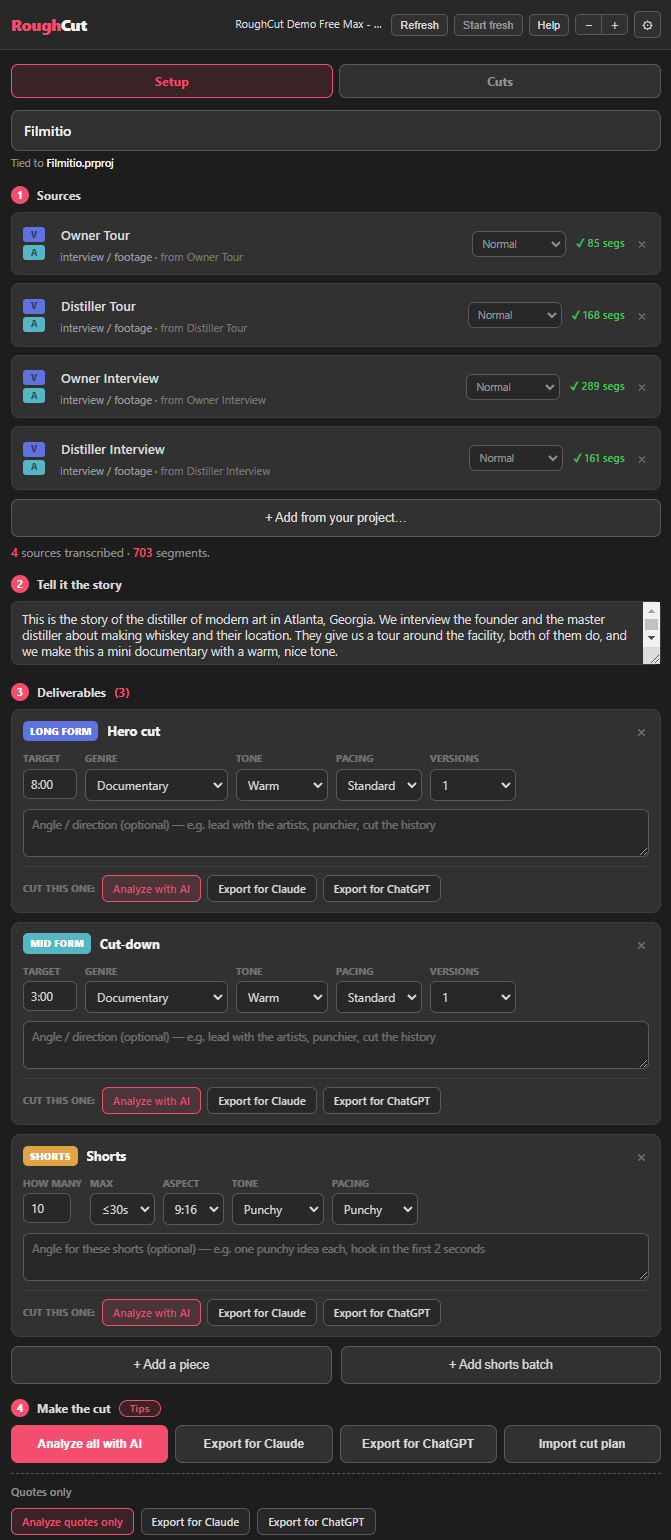
Pro Tip: You do not need an API key to try this. Point the analysis at a free Claude or ChatGPT account, import the cut plan it hands back, and the analysis costs you nothing. An API key just buys you a faster one-click run if you want one.
The after: a 2:17 rough cut, one click from your timeline
Here is the result. I asked for two minutes, and RoughCut came back at 2:17. Seventeen seconds over, and that is completely fine, because a rough cut is not meant to be exact. That is the whole idea. You get a first pass in the right ballpark, you read it, and if you like it you build it.
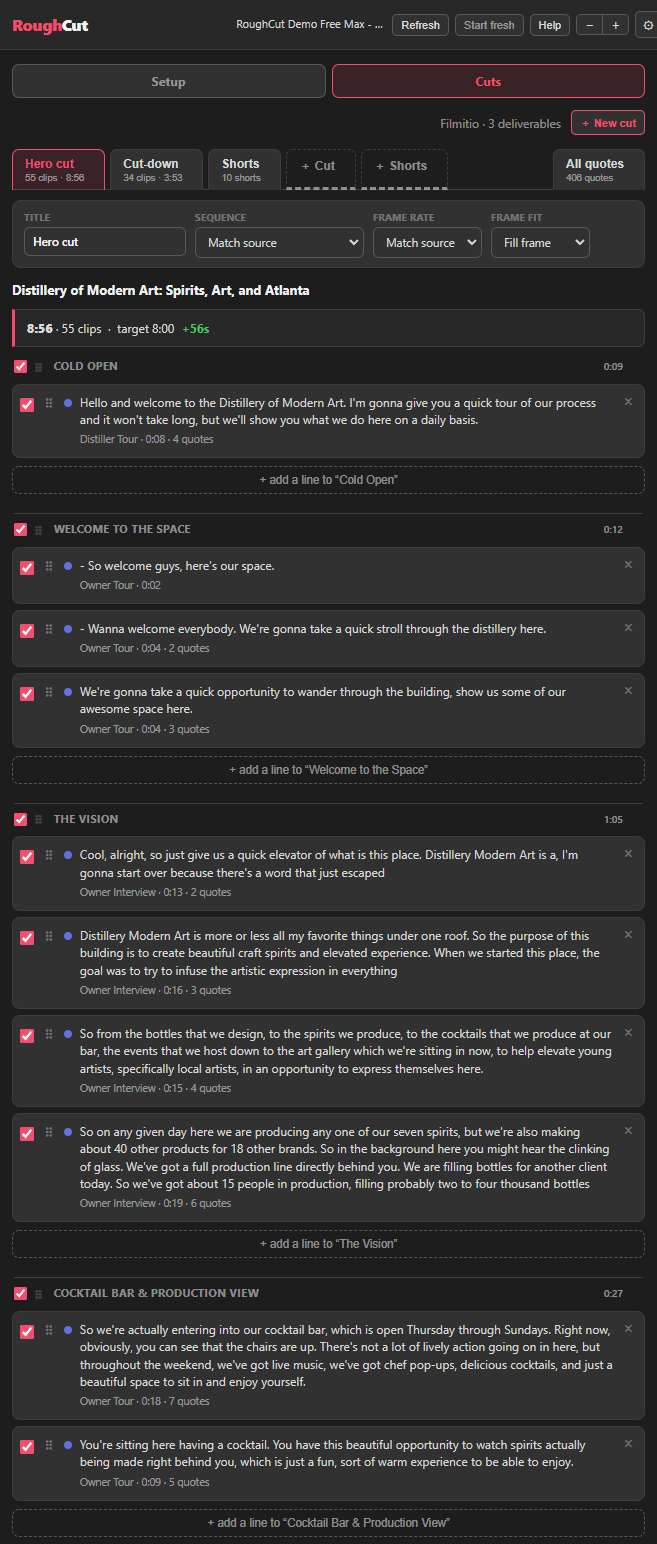
Building is one click. Build in Premiere drops a single deliverable onto your timeline, or Build all in Premiere assembles everything at once, the hero cut and every short in one pass. In the video I let the built hero cut play back so you can see it for yourself: a cold open, the owner walking you into the Distillery of Modern Art, the vision behind the place, all assembled from the interviews. It looks like a real first cut, because it is one.
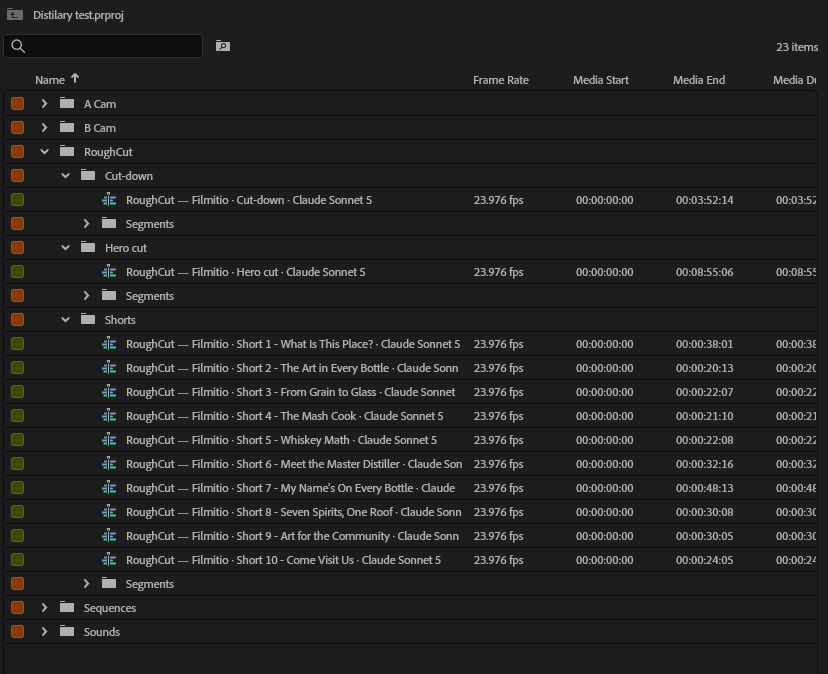
Pro Tip: Do not chase an exact runtime inside RoughCut. If the cut comes back long, pull a couple of quotes; if it comes back short, add a line. Dialing the precise length is your job as the editor, and it takes a minute once the first pass exists.
It is your assistant editor, not your replacement
This is the part I want to be clear about, because the video hammers it. RoughCut is not trying to edit your video for you. It is your assistant editor. It does the tedious assembly, the part that eats your afternoon, and it hands you a real first pass instead of a blank timeline.
From there you take over and make it great. You tighten the pacing, swap a weak line for a stronger one, layer in your B-roll, grade it, and do the craft that makes a cut yours. RoughCut gets you off zero. You do the part that makes it good.
Shaping what it built: finding the whiskey line
Because it is a rough cut, you change it. You can add a line to the cold open, reorder sections, and pull in anything RoughCut left out. Here is the concrete example from the video. I was on the Premiere timeline and wanted a line about whiskey that the hero cut did not include. Normally that means scrubbing back through 45 minutes of footage to find it.
Instead, I opened All Quotes and typed "whiskey." Every quote that mentions it showed up, all of them already transcribed, analyzed, and tagged with their B-roll. In this project there were 22 whiskey quotes. RoughCut even flags which ones are already in your hero cut, so you can see at a glance what is used and what is not. I found the one I wanted, hit Insert, and it dropped straight into the timeline exactly where I wanted it.
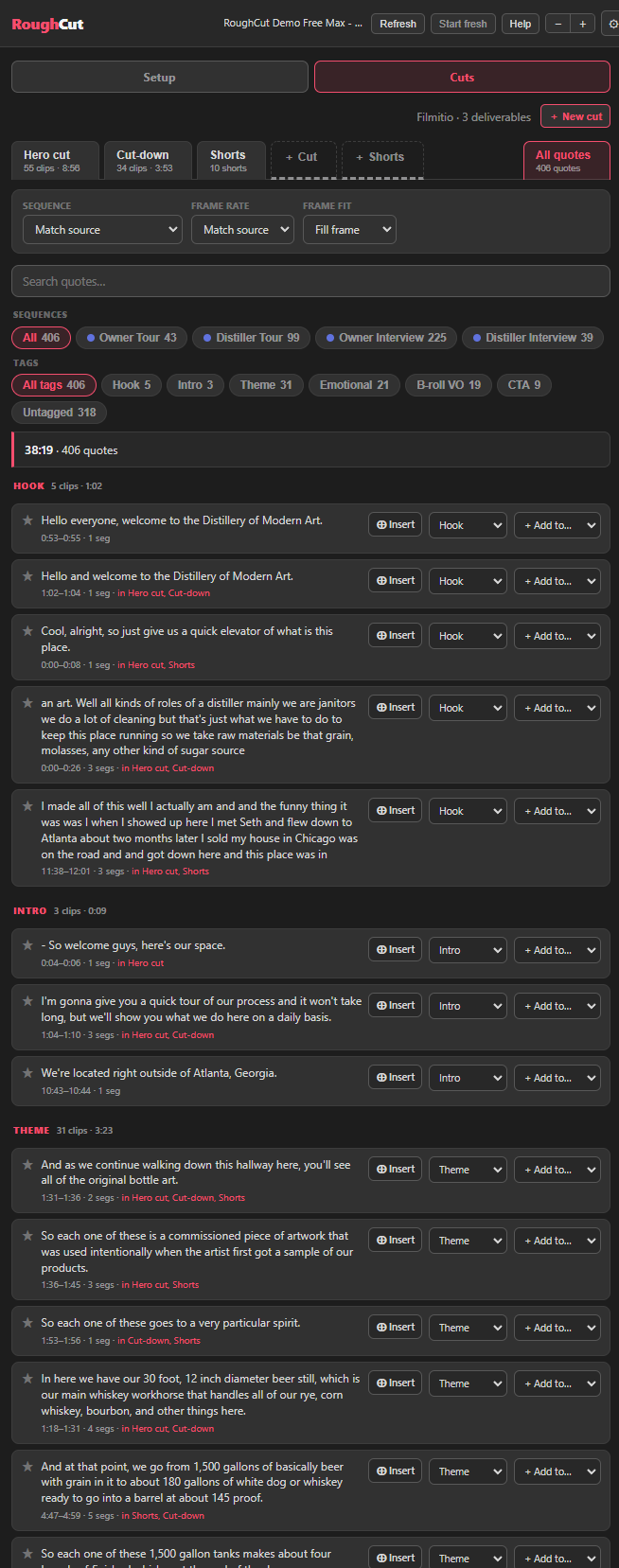
Pro Tip: All Quotes is a search engine for your own footage. Every line anyone said is tagged and ready to Insert, so when you know the moment you want, you type a word and drop it in, instead of hunting through raw clips.
Where it runs, and what it actually costs
This demo is in Premiere Pro, and RoughCut runs the same way in DaVinci Resolve and Final Cut Pro: analyze your sources, tell it the story, pick your deliverables, build. Whichever editor you live in, the before and after is the same.
On cost, the only step that can ever charge you is the AI analysis, the moment Claude or ChatGPT reads your transcript and designs the story, and only if you point it at your own API key (about $0.20 an analysis). I ran this one free with Claude, no key. Building the cut onto your timeline never costs anything, however many times you build, because that is just RoughCut assembling sequences on your own machine. What you actually pay for is the Filmit Studio subscription, which includes RoughCut: one price for the whole growing suite rather than a steep fee per plugin, and it is what funds the constant updates. A 7-day free trial unlocks all of it.
Key takeaways
RoughCut turns 45 minutes of raw interviews into an editable first pass on your timeline in minutes, and this is what that before and after actually looks like.
About 45 minutes of raw interviews went in, and a two-minute rough cut plus a batch of shorts came out a few minutes later, ready to edit on the timeline.
A two-minute target came back at 2:17, which is exactly right for a first pass that you then trim and shape to the length you need.
RoughCut is your assistant editor. It does the tedious assembly, and you take the lead on story, pacing, and color to make it great.
Reorder, add a line, and search All Quotes to Insert any line it left out, like the whiskey quote, straight into your timeline where you want it.
Run the analysis free with Claude or ChatGPT (or about $0.20 with your own key), building is always free, and it works in Premiere Pro, DaVinci Resolve, and Final Cut Pro.
Get started with Filmit
RoughCut installs through Filmit Studio, the desktop app you download from your dashboard to manage every Filmit plugin for Premiere Pro, DaVinci Resolve, and After Effects. It comes with a 7-day free trial that unlocks the whole bundle, and one install puts RoughCut in your editor so you can point it at your own footage and see your own before and after.
For what it is worth, I am Max, a filmmaker of 15-plus years. I run a production company and Filmit.io, and I build these tools because I use them every day. We drive them from community feedback, so if you want to watch RoughCut run live or tell us what to build next, come find us on Discord, where I demo the tools regularly. Start a free trial, point it at your footage, and let your assistant editor build the first pass.